
SOP to guide team members on how to set and edit working hours in HubSpot. By ensuring accurate working hours are set, it allows for better scheduling and efficient handoff between marketing and sales teams.
Context
This SOP is relevant for team members who need to align their availability with HubSpot’s scheduling and communication features. Proper setup of working hours helps streamline client interactions and internal scheduling.
Terminologies
- Working Hours: The time slots set in HubSpot when team members are available for meetings or communication.
- Meetings Scheduler: HubSpot tool used to set available times for meetings, allowing clients or leads to book based on team members' working hours.
Tools
Roles & responsibilities
- Sales Momentum: Oversee the setup and maintenance of working hours for team members, ensuring availability aligns with team and client needs.
- Client: Who will set their working hours depending on their availability to properly set up the schedule for the meetings.
Procedure
1. Log in to HubSpot
- Click the gear icon in the top-right to open Settings.

2. Access the ‘’Edit Working hours’’ section
- Click on General then click Profile

- Scroll down to find the Edit Working hours section.
- Click Edit working hours.

3. On the Working Hours tab
- Go to ‘’Preferences’’

4. Set Working Hours
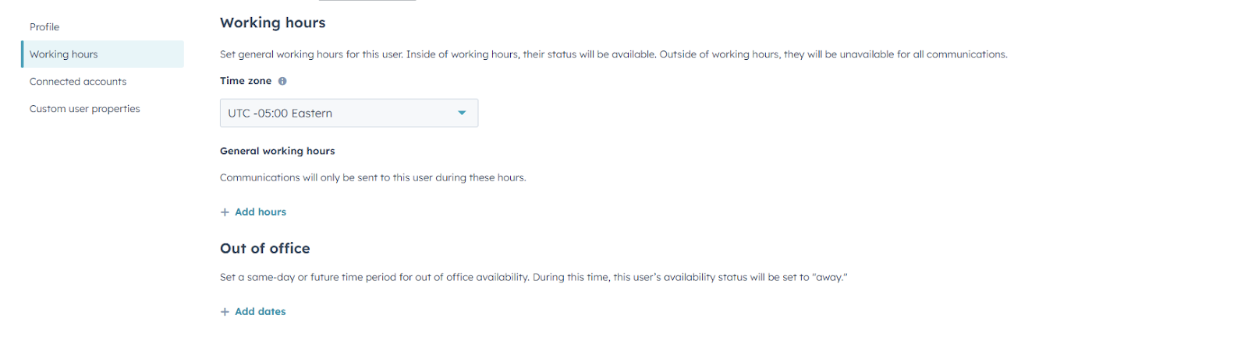
- Set your Timezone
- Set up your ‘’General Working hours’’
- Communications will only be sent to this user during these hours.
- Select the days of the week when you are available.
- For each selected day, set the specific working hours (e.g., 9:00 AM - 5:00 PM).
- You can set multiple time ranges for each day if your availability varies (e.g., 9:00 AM - 12:00 PM and 1:00 PM - 5:00 PM).
- Set up ‘’Out of Office’’
- Set a same-day or future time period for out of office availability. During this time, this user’s availability status will be set to "away."
 5. Save Changes
- Once you have set your working hours, click “Save” to apply the changes.
- Verify Availability in Meetings Scheduler
- Check the “Meetings Scheduler” to ensure your working hours are reflected accurately, allowing clients and leads to book within your set availability.