
Guide to ensure compliance and consistency by updating the company footer details for email templates and other communication within HubSpot.
Context
The company footer is required for marketing emails and other templates to meet legal and branding standards. This section stores important details like the company's name, address, and industry.Terminologies
- Company Footer: A section automatically included in marketing emails, containing essential company information.
- Required Fields: Mandatory fields that ensure compliance with email marketing laws such as GDPR and CAN-SPAM.
Tools
Roles & responsibilities
- Marketing Admin: Updates and verifies company footer details.
- Compliance Team: Ensures the information complies with relevant regulations.
Procedure
Step 1: Navigate to Company Settings
- Log in to HubSpot.
- Click on Settings in the top navigation bar.
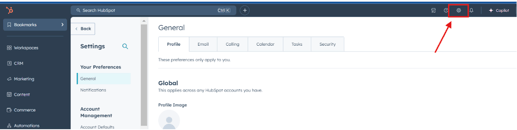
Step 2: Access General Company Information
- In the left-hand menu, go to General under the Account Settings section.
- Scroll down to the Company Information section.
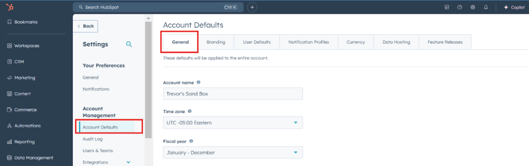
Step 3: Update Required Company Information
- Fill in or update the following fields:
- Company Name
- Company Address
- Company Address Line 2 (if applicable)
- Company City
- Company State
- Company Zip
- Company Country
- Company Industry
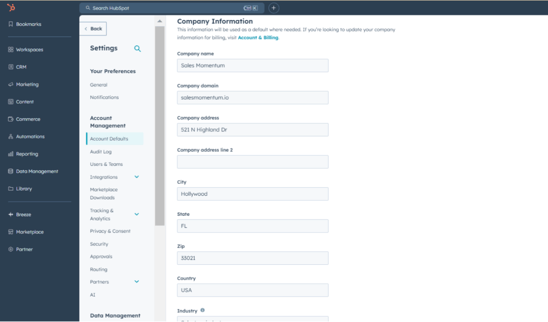
Step 4: Save Changes
- Review the information for accuracy.
- Click Save to apply the changes.
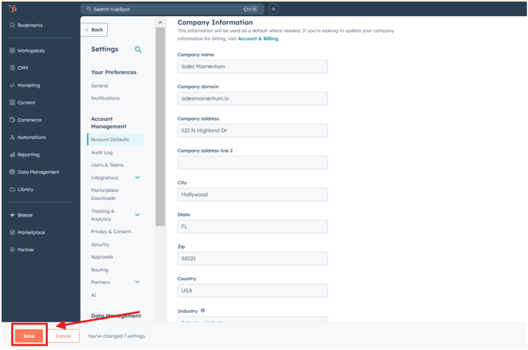
Notes
- Ensure the details entered align with your company's registered business information.
- The updated footer will automatically reflect on marketing email templates and other relevant communications.
- Regularly review and update this information as needed to maintain compliance and accuracy.