
Step-by-step guide for updating the company brand kit. This ensures consistency across all company communications and marketing assets by centralizing the brand’s visual and stylistic elements.
Context
Updating the brand kit helps maintain a cohesive brand identity across different platforms and projects. This guide will help ensure the brand's look and feel are applied correctly in all relevant materials.
Terminologies
- Brand Kit: A collection of the visual elements that represent the brand, including logos, colors, and themes.
- Favicon: A small icon that represents the brand, typically seen in browser tabs and bookmarks.
- Brand Voice: The consistent tone and style in which the brand communicates.
Tools
Add any relevant tools associated with this process.
- Hubspot - Used for accessing and editing account defaults and brand kit settings.
Roles & responsibilities
Define who will be executing the activities related to the SOP. \
- Team Member: Responsible for updating and maintaining the brand kit.
- Design Team: Provides input on the brand kit components, such as logos and color schemes.
- Approver: Reviews and approves changes to the brand kit.
Procedure
Follow these steps to update the Company Brand Kit:
Step 1:
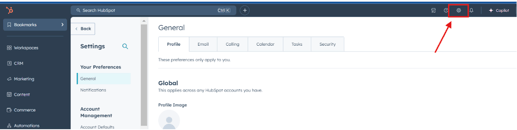
Navigate to Settings in your HubSpot.
Step 2:
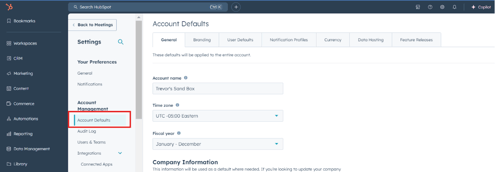
Select Account Defaults from the settings menu.
Step 3:
Click on Branding and choose Create a new brand kit or edit an existing one.

Step 4:
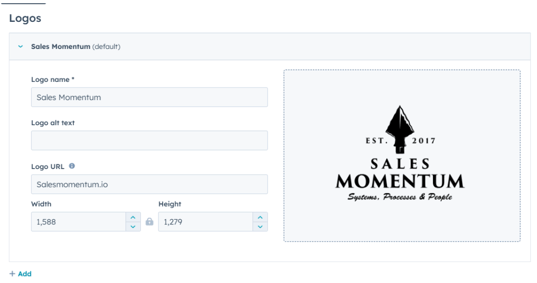
Add or update the Logo:
- Upload the logo file.
- Enter relevant logo information, such as size specifications or usage notes.
Step 5:
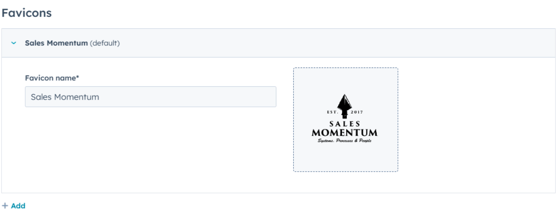
Add or update Favicons:
- Upload the favicon image.
- Enter favicon information, such as dimensions and file format specifications.
Step 6:
Add Colors:
- Define and save the primary and secondary colors used by the brand (e.g., HEX codes, RGB values).

Step 7:
Set Themes (if applicable):
- Apply or customize existing themes for various platforms, including website headers, footers, and email templates.
Step 8:
Set the Brand Voice (if applicable):
- Define the brand voice, including tone guidelines, preferred language style, and messaging examples.
Step 9:
Save the updates to the brand kit.
Notes
- Regularly review the brand kit to ensure it reflects any recent changes to the brand identity.
- Collaborate with the marketing or design team for consistent updates and visual improvements.